





From LMS to Mastery: PathBuilder for Moodle, Canvas, Classroom
Traditional LMS tools store content and grades. They rarely tell a student what to do next or show a chair exactly where cohorts stall. PathBuilder becomes the hub for teaching and assessment so your team can:
- Assign the next best activity based on progress, not a long list of links
- Track results by outcome, attempt, cohort, and campus
- Keep integrity rules and rubrics consistent across sections
- Export final grades to the SIS without extra spreadsheets
What “replace” means in day-to-day work
PathBuilder handles the full course delivery cycle:
- Course shells, sections, schedules
- Authoring with item banks and adaptive paths
- Assignments, quizzes, practicals, portfolio tasks
- Rubrics that include disclosure and attribution
- Outcomes mapping to programs, standards, licensure targets
- Feedback windows, reattempt rules, mastery gates
- Gradebook, score policies, grade passback, SIS export
You can keep the legacy LMS as read-only for archives, or use it during a short bridge period while PathBuilder runs the course.
See how PathBuilder compares with a traditional LMS
| Focus area | Traditional LMS | With PathBuilder |
| Students finish more of the right work | Shows completion and course averages. Next steps are unclear and follow ups are manual. | Records why each task was assigned, what feedback was given, and whether it helped. Guides the next step automatically and tracks gains by outcome. |
| Faculty get time back | Rebuilds every term, re-links content, manages variants by hand. | Author once and reuse. Templates, shared banks, and rotation reduce prep time each term. |
| Integrity is practical | Relies mostly on similarity checks. AI rules are unclear. Detector scores can be misused. | Built-in disclosure prompts, draft history, short oral checks, and clear rubric criteria. Human review uses evidence stored with each attempt. |
| Operations run smoother | Inconsistent policies for reattempts and late work. SIS exports need cleanup. Support spikes at term close. | Consistent rules across sections, clean SIS export, and fewer exceptions. Help tickets drop at the end of term. |
What PathBuilder replaces
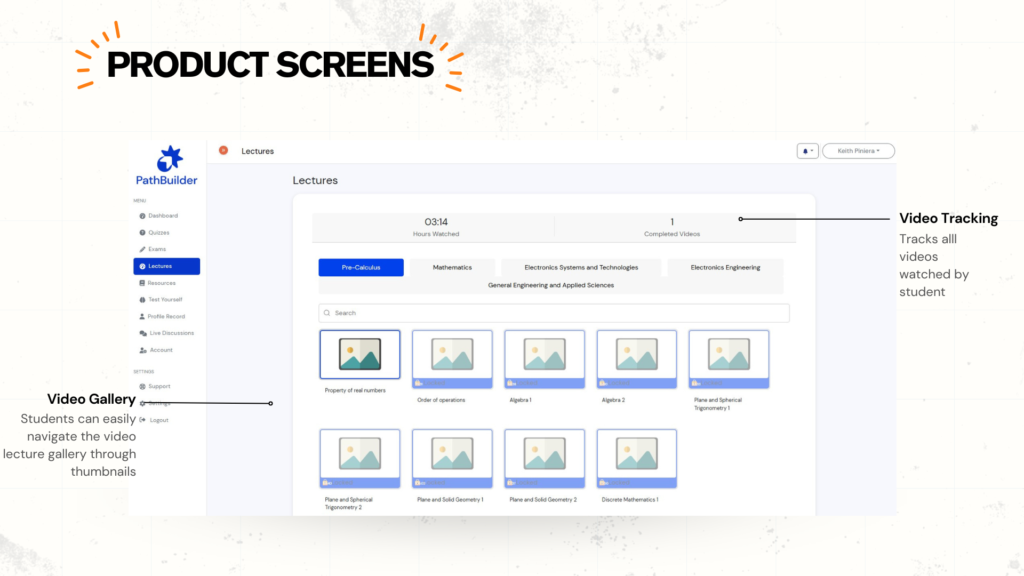
- LMS pages and modules → PathBuilder course shells with adaptive paths
- LMS assignments and quizzes → PathBuilder activities, item banks, mastery rules
- LMS rubrics → PathBuilder rubric libraries with disclosure and attribution
- LMS outcomes tools → PathBuilder outcomes mapping for programs and standards
- LMS gradebook → PathBuilder gradebook with grade passback or direct SIS export
- LMS analytics → PathBuilder mastery and outcome reports with cohort filters
Migration options that reduce risk
Pick the path that fits your calendar and risk appetite. Both options support Moodle integration, Canvas integration, and Google Classroom sync during a bridge period, with grade passback and outcomes mapping in place from day one.
| Item | Option 1. Parallel run, then retire | Option 2. Immediate cutover for selected programs |
| Best for | Large schools that need a calm term while staff learn the flow | Programs that need results this term and can move fast |
| Typical timeline | One term | 4 to 8 weeks for a pilot set of programs |
| Change load | Lower. Daily routines stay familiar while PathBuilder runs teaching | Higher. Targeted teams switch fully to PathBuilder |
| Risk controls | Legacy LMS remains active for announcements and archives | Legacy LMS kept read only for prior terms |
| Tech setup | LTI to enable grade passback and roster sync, SIS export tested | Direct SIS export tested, optional LMS links for reference only |
Option 1. Parallel run, then retire
Goal: Run teaching and grading in PathBuilder while the legacy LMS stays available for announcements and archives. Retire the LMS at the end of the term.
Phases
- Prepare, weeks 1 to 2
- Confirm SSO and SIS connections
- Turn on grade passback for Moodle or Canvas, or Classroom grade updates
- Import banks, rubrics, and outcomes mapping
- Train a core group of instructors
- Pilot, weeks 3 to 5
- Link two PathBuilder activities per pilot course from the LMS shell
- Verify scores in the LMS gradebook and in the SIS test record
- Review staff and student feedback after the first submission window
- Expand, weeks 6 to 10
- Move remaining activities into PathBuilder
- Switch off unused LMS features as courses migrate
- Monitor integrity workflow, feedback return times, and completion by outcome
- Retire, weeks 11 to 12
- Export final grades to the SIS
- Lock the LMS to read only and keep an archive for prior terms
- Publish the retirement date and support contacts
Go live checklist
- Grade passback verified for each course
- Outcomes mapping visible in reports
- Roster sync confirmed daily
- Archive plan approved by records officer
Option 2. Immediate cutover for selected programs
Goal: Move priority programs into PathBuilder now, then expand once staff confirm the flow.
Phases
- Scope, week 1
- Select programs with clear completion or licensure targets
- Import outcomes, banks, and rubrics
- Set mastery rules and reattempt policies
- Cutover, weeks 2 to 3
- Deliver all teaching in PathBuilder
- Export grades directly to the SIS
- Keep the legacy LMS read only for prior terms and reference links
- Stabilize, weeks 4 to 6
- Review reports by outcome and cohort
- Tune item banks and variant rotation
- Add more courses once staff sign off
Go live checklist
- Direct SIS export tested and documented
- Integrity workflow assigned with named reviewers
- Staff and student guides posted in course shells
- Legacy LMS links removed or marked read only
Notes for Google Workspace schools
Schools on Workspace can keep Google Classroom sync during either path. Use Classroom APIs to create coursework, update grades, and maintain a light footprint for announcements while PathBuilder handles teaching and assessment. When staff are ready, turn off sync and keep Classroom as read only for past terms.
Communication plan you can copy
- Pre-term email to instructors with a 30 minute quick-start video
- In-course message to students on how to submit, disclose AI use, and view feedback
- Weekly update to program leads with completion and outcomes highlights
- End-of-term note with the retirement date for Moodle, Canvas, or Classroom and where to find the archive
Success criteria to track
- Grade passback or SIS export exceptions fewer than 1 percent
- Feedback returned within your policy window
- Completion by outcome up term on term
- Integrity cases resolved within the set timeline
Course readiness checklist
Use this before the first high-stakes submission.
- Outcome map completed and tagged to each major task
- Templates applied, item banks linked, variant rotation set
- Rubrics reviewed for disclosure, attribution, and method
- Integrity workflow assigned with named reviewers and timelines
- Mastery rules and reattempt policies confirmed
- Grade passback tested to the LMS during the bridge, or direct SIS export tested if replacing now
Common mistakes and how to avoid them
- Building from scratch every term: Use templates and shared banks. Lock outcome tags at the template level.
- Unclear AI rules: Add a short disclosure field on each assignment. Include one acceptable and one not acceptable example.
- Only average-based reporting: Review by outcome and attempt. Set a weekly check for cohorts that trend below target.
- Late SIS testing: Test SIS export or grade passback in week one. Avoid last-minute surprises at term close.
What a normal week looks like after replacement
- A faculty member posts a case study with two variants. PathBuilder assigns the right one based on mastery, prompts a short viva recording, and scores with the rubric.
- A review center runs a Friday diagnostic. Students who miss a threshold receive a tailored practice set that opens on Monday.
- A dean checks a cohort view mid-term and sees outcomes that need attention. A short mastery task is assigned to the right group in minutes.
- QA flags an assessment with outliers, opens attempts, reads notes, and records follow-up actions in one screen.
Metrics to track from day one
- Completion by outcome and cohort
- Share of tasks using mastery rules and staged submissions
- Time to return feedback on high-stakes work
- Integrity case resolution time
- SIS export exceptions per term
Frequently asked questions
Can we keep our LMS for communications only?
Yes. Keep announcements during a bridge period. Teaching and grading run in PathBuilder.
Do we lose standards alignment?
No. Outcomes mapping is core. Tags stay consistent across courses and terms.
What about records and audits?
Draft history, rubric decisions, and feedback stay with each attempt. Export evidence by outcome, course, cohort, or campus.
How do Google Workspace schools proceed?
Use Google Classroom sync during migration, then switch fully to PathBuilder once grades and attendance processes are covered.
Next steps
- Pick one program that needs measurable gains this term.
- Import outcomes, banks, and rubrics.
- Run one full course in PathBuilder with grade passback to the LMS or direct SIS export.
- Review results by outcome after week four, then plan the next wave.
If you want a quick scoping call, connect through the Makarius Smart Learning contact page or contact our team today.










The PathBuilder team is a dynamic group of dedicated professionals passionate about transforming education through adaptive learning technology. With expertise spanning curriculum design, AI-driven personalization, and platform development, the team works tirelessly to create unique learning pathways tailored to every student’s needs. Their commitment to educational innovation and student success drives PathBuilder’s mission to redefine how people learn and grow in a rapidly changing world.